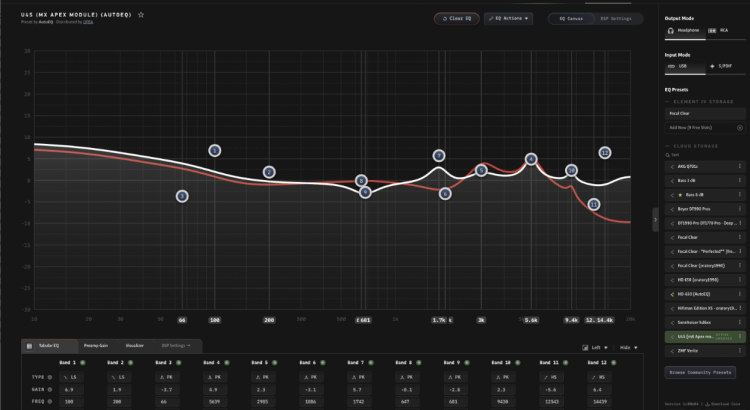
Our firmware team has been busy! Last month we released Element IV firmware v2.0.2, unlocking separate Left and Right PEQ bands. You can now adjust up to 12 bands of equalization per channel (up to 24 bands total). And in the most recent v2.1.0 update, we’ve rewritten volume logic and zero crossing detection for an even smoother experience.
Left/Right Parametric EQ
A number of Element IV owners requested separate Left/Right PEQ for 2-channel room correction or to address asymmetric hearing loss. Processing separate curves per channel adds only slightly more overhead, since every sample is already being processed either way.
Nothing has changed by default. You’ll find a new “L+R” dropdown in the right corner of the EQ table:
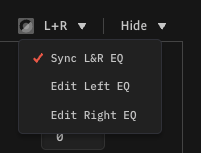
A white curve appears when editing the Left EQ, and a red curve corresponds to the Right EQ. Because per-channel equalization is specific to a room or a pair of ears, preset sharing is only available in ‘Sync L&R’ mode.
Native Volume and Zero-Crossing Detection

Until now, Element IV relied on the volume control registers of its DAC. Full scale audio samples were sent to the ESS DAC, which handled attenuation. For safety, firmware all the way back to Element III had checked the ESS DAC every 5ms to ensure volume was always set at the intended level. But this approach felt backwards. It’s better to prevent an error than to correct errors that have already occurred.
In firmware v2.1.0+, volume is now managed by attenuating I2S samples before they reach the DAC, thereby eliminating the ESS chip as a point of error. We’ve also implemented our own zero-crossing algorithm to keep the experience audibly smooth. Performance is identical in terms of THD+N and linearity, so v2.1.0 defaults to the new “XMOS” Volume Processing mode.
Adding zero-crossing detection throughout the DSP pipeline makes changes smoother. Volume changes with Loudness enabled are especially more pleasant.
Note: All PCM and XMOS S/PDIF audio streams utilize native XMOS Volume Processing. DSD/DoP playback and ESS S/PDIF mode continue to adjust volume at the ESS DAC. You can opt for ESS based volume processing from Device Settings to compare, but there is no incentive to do so.
Faster DSP Changes
We encountered a technical hurdle during development way back in 2024, long before Core was a reality: It was not possible to read/write to flash while sending I2S audio to the DAC. We devised a complicated workaround involving stopping the audio stream every time flash was accessed, and then restarting. That’s why you hear a mute upon making DSP changes. It turns out a simpler solution was available all along. A one-line code change resolved the resource conflict.
We’ve shortened the mute duration between DSP changes since flash access no longer disrupts audio. Fully eliminating the mute is possible but introduces audible discontinuities during large filter state changes, so for now a brief mute remains.
Other Changes
The rarely used “Mute S/PDIF” knob button option has been replaced with a more commonly requested UAC1/UAC2 mode toggle, and UAC1 mode is now shown on the main status screen since it was previously unclear when UAC1 was active. Please see release notes in Core for a full list of smaller improvements.
Proper Q Rendering in Core
Not a firmware change, but a notable improvement: Core now uses a pure-math implementation of the Audio EQ Cookbook formulas instead of relying on the Web Audio API. The Web API fixed shelf Q at 0.707, so even though firmware has always accepted custom Q values, the EQ curve displayed Q = 0.707 for all lowshelf and highshelf filters. Core now accurately renders the curve, matching firmware.
Awesome update! I’m looking forward to checking it out.
The lag/mute when changing EQ parameters was the only thing I liked better about Equalizer APO compared to Core. (Overall the benefits, like EQ that can be stored to the device and used with different inputs, still weighed heavily toward Core.)
I swear the lag time had been improved a bit already with previous updates (possibly just placebo), but I’m curious to see how seamless it is now.
When seriously comparing profiles or making EQ adjustments I previously found pausing the music, making the adjustment, and quickly hitting play again was the best way to do things, as the pause/lag was just distracting enough to make it hard to evaluate small changes to filters.